
Marine cable routing platform
Unreal Routing. Route the whole boat. Prove it complies.
Cable routing is still the spreadsheet discipline in shipbuilding — and its mistakes surface at install. Unreal Routing puts the tray network, every circuit, the marine electrical rules, and the shop floor in one database, and meets your designers in the CAD tools they already use.
- Compliance checks (USCG)
- 25
- Regulatory regimes
- 4
- To route a circuit, 100k ship
- < 5 s
- Circuits per vessel — proven
- 100k
- Surfaces: web + 3 CAD tools
- 4
- Production exports
- ~20
The problem
Thousands of circuits. Hard rules. Errors found at install.
Every circuit on a vessel is bound by segregation, tray fill, weight, voltage drop, ambient derating, and flag-state or class rules that differ by vessel. Most yards still manage that in spreadsheets and marked-up drawings, so the engineering office, the CAD model and the shop floor each keep their own list. The mismatches show up as rework: re-pulled cable, overfilled trays, and findings after the inspector's walk-through.
How it works
From tray model to pulled cable, in one database.
Load the vessel
Import your cable schedule, devices, compartments, and tray network from CSV or Excel — or push the tray model straight from AutoCAD, Navisworks, or Revit.
Route the whole boat
Route the circuit you just changed in seconds, or every circuit on the vessel in one server-side run — segregation, tray fill, weight, and compartment restrictions enforced inside the pathfinder.
Prove it complies
Set the regime the vessel is inspected under. The rule engine runs the checks that regime requires and cites the section behind every finding.
Run the shop floor
Pull sheets, drum assignments, labels, and MTOs come from the same database — and installers update status by scanning a QR code.
In the product
Not a mockup. The actual platform.
Screenshots from a demo project with synthetic vessel data. Click any image for full size.
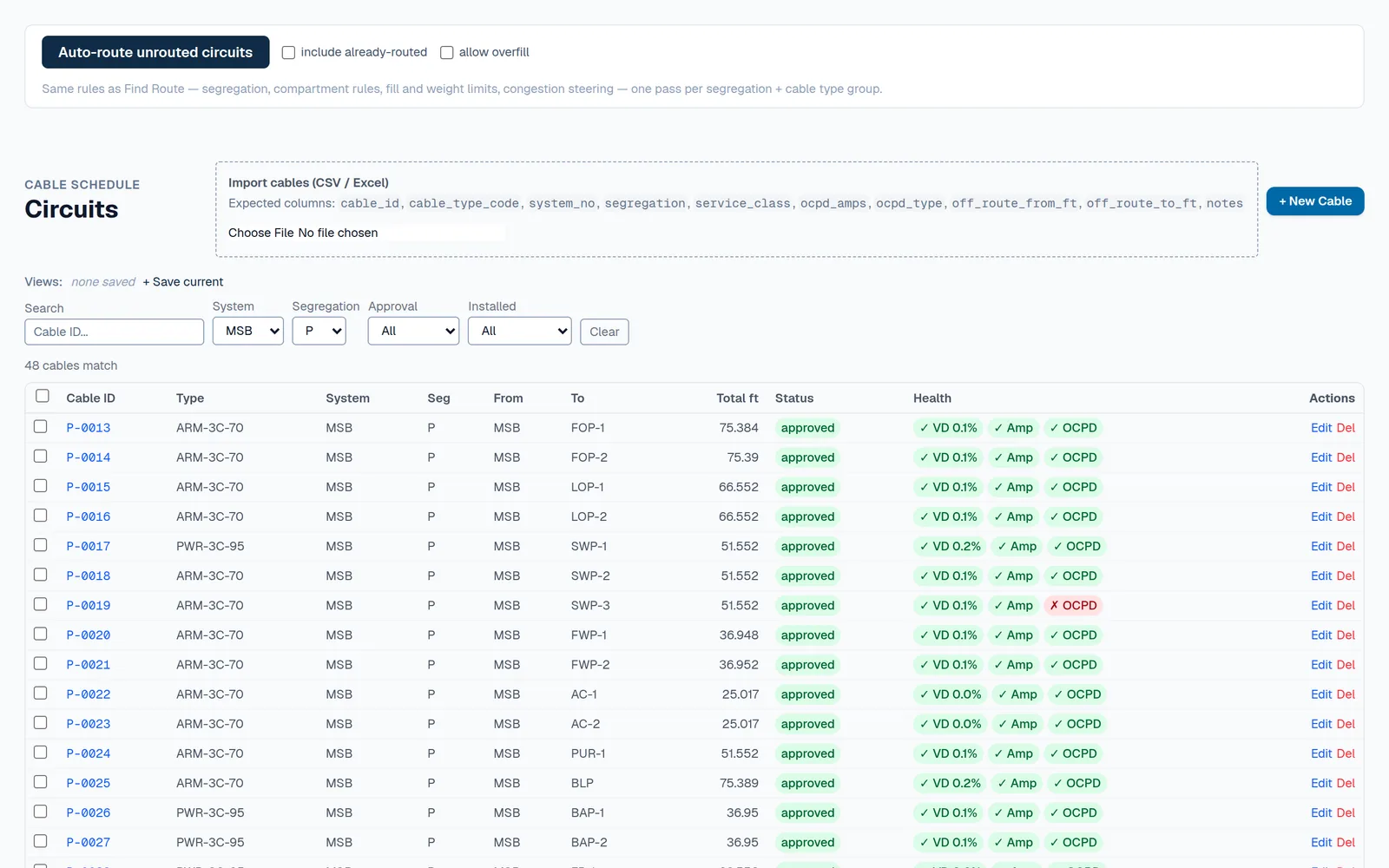
Every circuit, checked as it routes
Batch-route the schedule, then read each circuit’s health — voltage drop, installed ampacity, and breaker sizing — right on the list. Import the schedule from CSV or Excel to start.
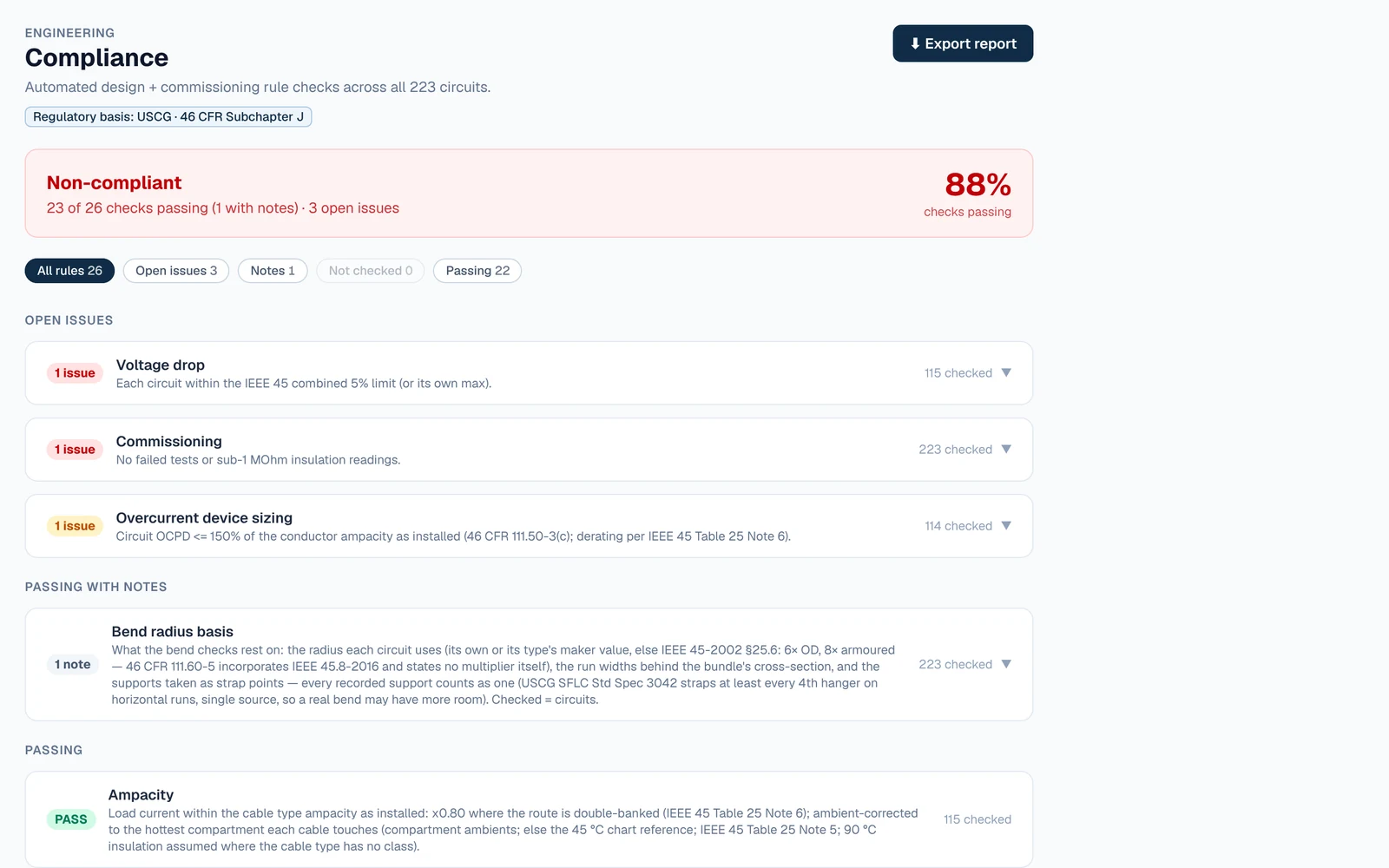
Compliance, with the citation
Set the regime once — here USCG 46 CFR Subchapter J — and every check reports what it tested, how many it flags, and the rule behind it. On the demo vessel 23 of 26 pass — hanger loads and every bend included — and the three open issues are planted; a note says what the bend checks rest on, and a note is never counted as an issue.
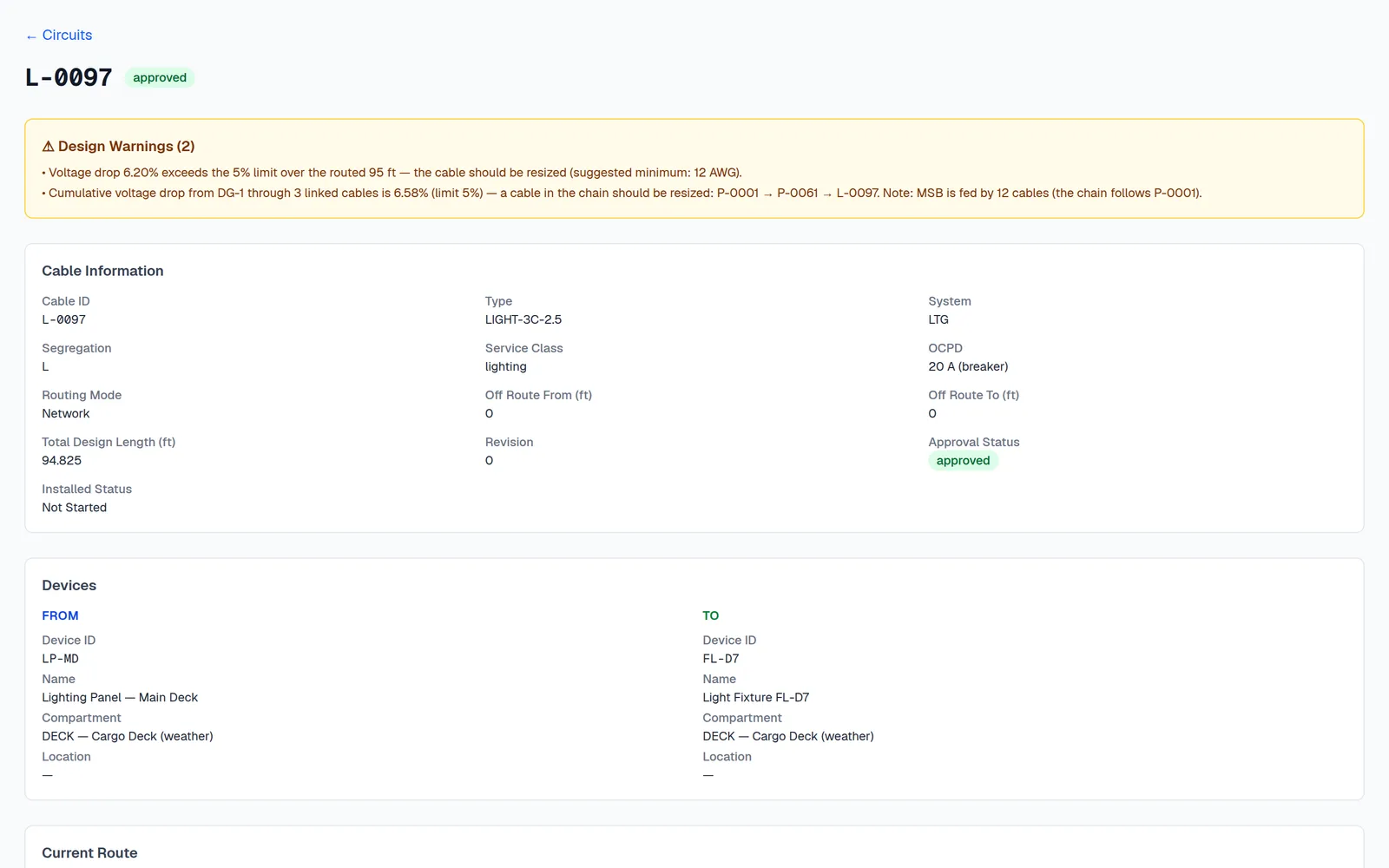
Errors caught at the desk, not at install
Each circuit carries its own findings in plain language — here a floodlight branch over the voltage-drop limit, with a suggested conductor size and the cumulative drop back to the generator. Fault withstand, breaker sizing and watertight transits are checked the same way.
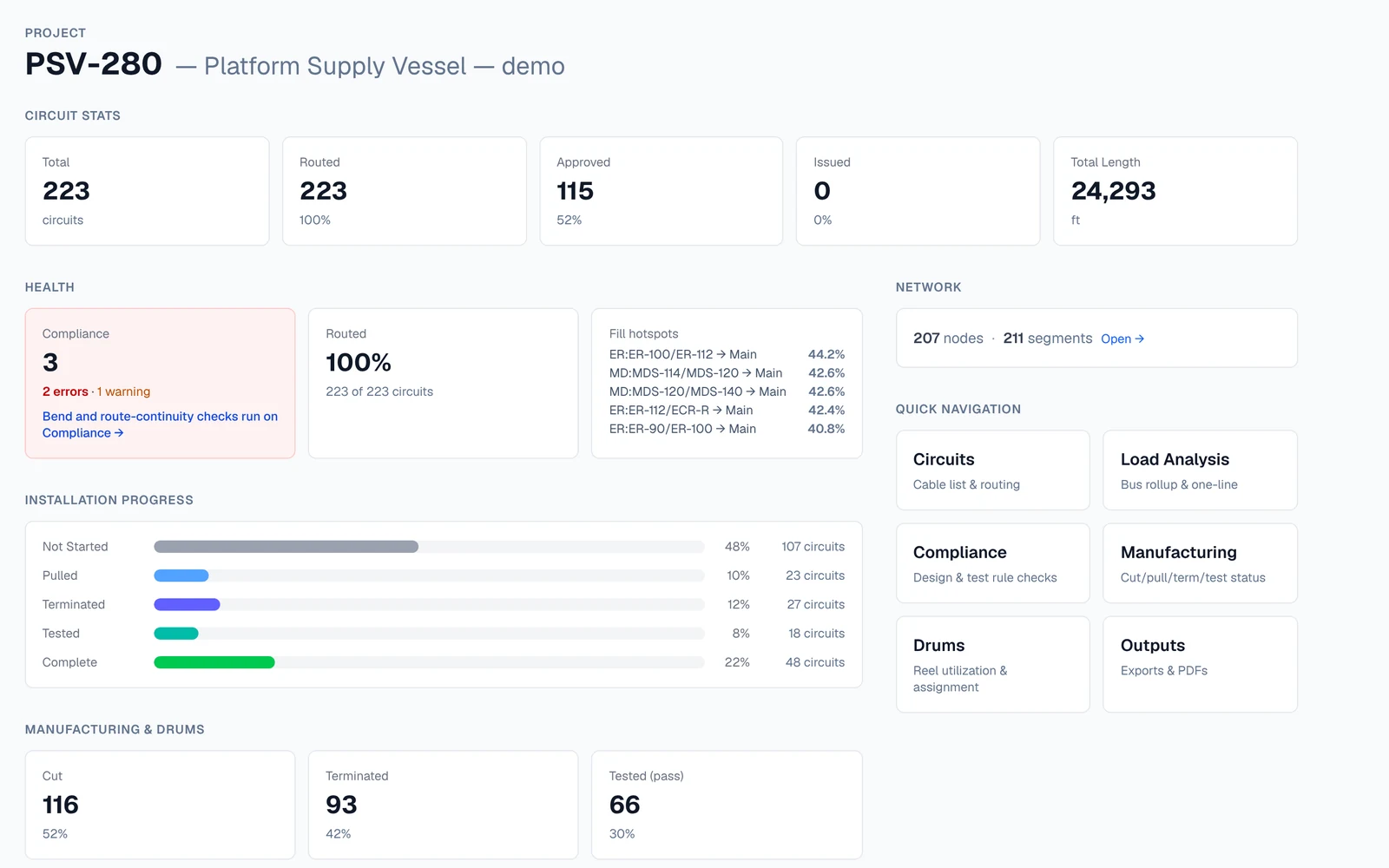
One view of the whole vessel
Open compliance findings, routed and approved percentages, the fullest trays, installation progress and the shop-floor counts — computed in the database, not the browser, for vessels sized to 100k circuits.
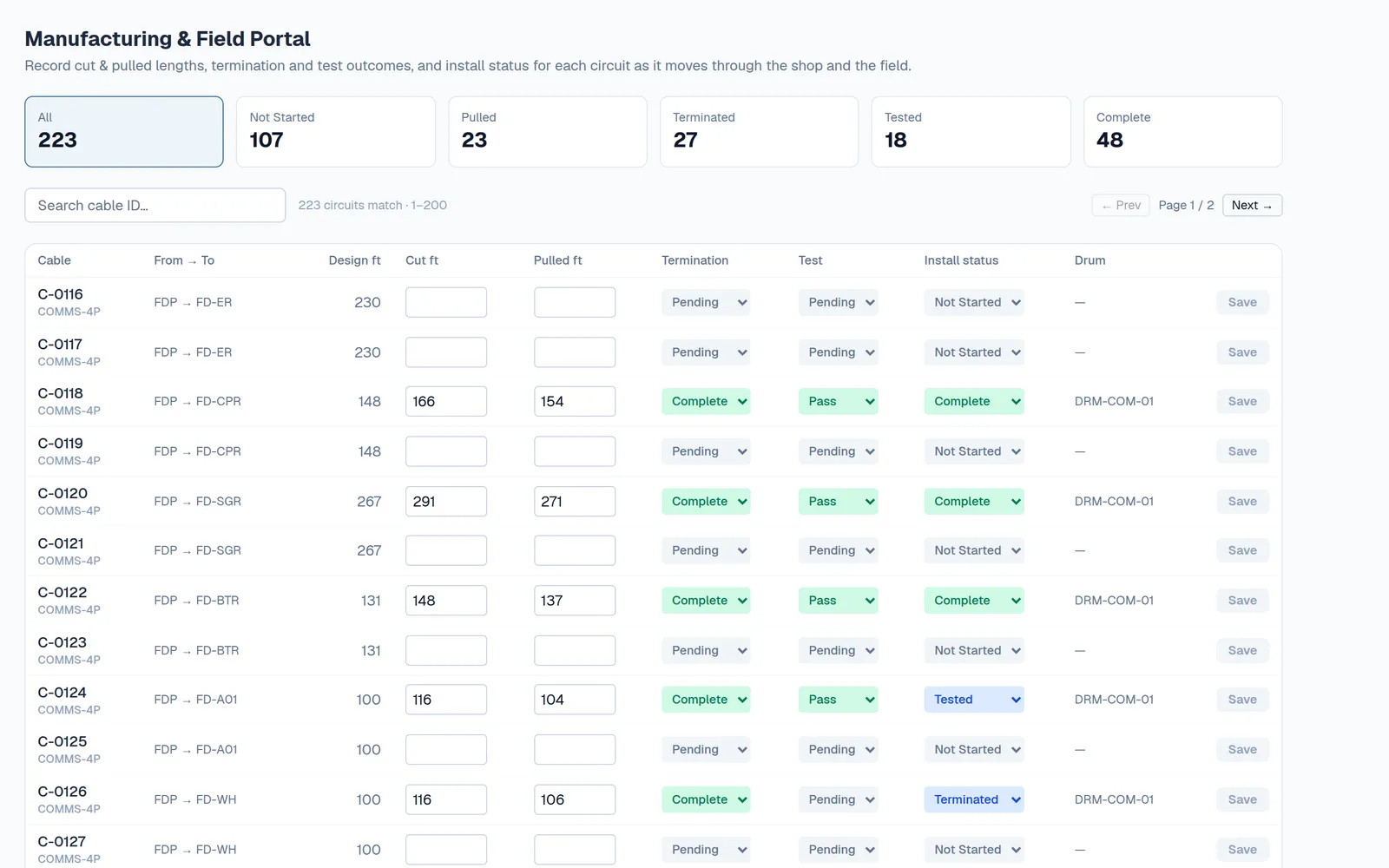
The shop floor on the same data
Cut and pulled lengths, termination and test results, install status, and drum assignment for every circuit — recorded where the work happens.
Feature breakdown
Design, compliance, and the shop floor — connected.
Cable-list tools stop at the list. Generic raceway tools don't know the marine rules. Unreal Routing connects the routing, the rules and the shop floor.
Routing engine
Constraint-aware routing
Shortest compliant path per cable, honoring segregation classes, tray fill and weight limits, pass-through-blocked compartments, and per-compartment cable-type bans. Route one circuit, or the handful a change touches, in seconds — about 1 s, under 5 s on a cold connection, on a 100,000-circuit ship in production — or the whole vessel in passes when you need it.
True cable placement
A cross-section solver packs every cable into its real slot on the tray — banking, bank gaps, class separation — so the 3D view and the CAD drawings show where cable actually sits, not a centerline.
Change-safe re-routing
Move a node or edit a run and every routed length through it updates; change a circuit’s endpoint and a route that no longer reaches it is cleared and flagged, never left on a silently invalid path. Re-route the lot in one batch; overfilling a tray is an explicit, confirmed override.
Marine compliance & electrical
Regime-aware rule engine
Up to 26 checks under USCG 46 CFR Subchapter J, fewer under ABS River & ICW Rules, IEEE 45 or IEC 60092 — including conductor sizing (46 CFR 111.60-4), emergency-cable routing (112.05-5(f)), overcurrent protection (111.50-3(c)), and every route’s bends and continuity — plus redundant feeders checked for separate trays and transits.
Ampacity as installed
Chart ampacity corrected for how the cable is actually run: double-banked or bunched on its real route, the hottest compartment it passes through, and its insulation class. One number, the same everywhere.
Full electrical calc suite
Voltage drop, derating, bend radius, short-circuit withstand, pull tension, conduit fill, breaker and battery sizing — plus electrical load analysis and cumulative voltage drop up the feeder chain.
Hardware, penetrations & equipment
Hanger assemblies, auto-generated
Downcomers, cross tiers, and banding or tapped hangers sized from the real cable bundle and the overhead steel, using FMD / RT&D part families or your own catalog. The BOM is orderable, not notional.
Penetration engineering
Roxtec-style multi-cable frames, MIL-S-24235 swage tubes, nylon tubes, and custom openings — with an automatic packing solver and fire-boundary checks on every transit.
Equipment prep
Engineer the last inch: entry hardware for every cable landing on every device, tube sizes suggested from cable OD, per-device prep sheets, and the hardware rolled into the MTO.
Manufacturing & installation
Drum management
Reel inventory with automatic first-fit assignment of cut lengths to drums, so the cable you order is the cable you pull.
Pull plans & batch pull sheets
Shop-floor pull sequences by drum, largest cable first, issued as frozen batch pull sheets with QR codes.
Floor mode
Installers scan a cable’s QR code at the job and tap big buttons — cut, pulled, terminated, tested. Status lands in the same database the office works from.
Program control
Multi-hull effectivity
One project is the contract baseline; each cable applies to all hulls or specific sister hulls, with per-hull circuit lists and per-hull compliance.
Change control
Approval locks a circuit at a revision, on the web and in every CAD plugin. When the model moves under it, the database flags it, logs what changed and why, and warns if the cable is already cut or pulled. Holds stop the floor.
Weight & CG from real routes
Cable weight spread along actual routed paths, rolled up by deck and compartment with center of gravity — and the basis disclosed, catalog vs estimated vs unknown.
Everything in the platform
80 capabilities, one database.
The highlights are above. This is the full index, grouped the way a vessel moves through the job. The platform guide explains what each feature does and how they connect.
01 · 13 features
The vessel model
The 3D road map every cable follows, and the reference data every other page reads.
- 3D tray network
- Interactive 3D viewer
- Ship model underlay (IFC)
- Compartment-scoped loading
- Raceways and tiers
- Compartments and 3D volumes
- Segregation classes and separations
- Cable type catalog
- Devices and systems
- Ship structure
- Multi-hull contracts
- Project cloning
- Routing policy
02 · 10 features
Circuits and routing
The cable schedule, and the engine that finds a legal path for every circuit.
- Cable schedule
- Auto-routing
- Straight answers on what didn’t route
- Three ways to route one circuit
- Rules enforced on every route
- Change-safe network edits
- True cable placement
- Segment inspector
- Approvals and revision history
- Design assistant
03 · 8 features
Electrical engineering
Sizing and analysis that use each cable’s real route, not a guess.
- Voltage drop and conductor sizing
- Cumulative drop up the feeder chain
- Ampacity as installed
- Short-circuit withstand
- Overcurrent protection
- Electrical load analysis
- Weight and center of gravity
- 20 engineering calculators
04 · 5 features
Compliance
Automated rule checks under the rulebook the vessel is actually inspected or classed under.
- Regime-aware rule engine
- Findings you can act on
- Honest about gaps
- Per-hull compliance
- Design warnings on every circuit
05 · 5 features
Hardware, penetrations and equipment
The physical parts: supports, bulkhead crossings, and the last inch into the equipment.
- Hanger assemblies
- Parts catalog and part numbers
- Penetration register
- Exact transit packing
- Equipment prep
06 · 5 features
Terminations, wiring and harnesses
Conductor-level detail, from the connector on each end to the terminal it lands on.
- Terminations
- Pin assignments
- Device terminals and wiring diagrams
- Harnesses and formboards
- Block and label libraries
07 · 7 features
Manufacturing and the shop floor
The same database that holds the design runs the cut, the pull and the test.
- Output batches
- Pull sheets with QR codes
- Drum management
- Pull plan
- Manufacturing status board
- Shop Floor on a phone
- Commissioning records
08 · 13 features
Reports and exports
Every deliverable straight from project data, as CSV or Excel.
- Circuit record and route details
- Connection schedule
- Cable tag and label sheet
- Cut list and reel plan
- Material take-off (BOM)
- Raceway fill and spare capacity
- Segregation audit and clash report
- Penetration register
- Revision change log
- Weight by deck
- Commissioning (IR) record
- Compliance report
- Network dump and project backup
09 · 3 features
Inside your CAD tools
Three native plugins, signed in as the same user against the same live data.
- AutoCAD — 49 commands
- Navisworks — review and refit
- Revit — native tray and conduit
10 · 11 features
Platform and deployment
Roles, audit trail, licensing, and a choice of cloud or your own servers.
- Project roles
- Custom role bundles
- Per-project access
- Activity log
- Project dashboard
- Built-in training guide
- Demo vessel in one click
- Named-seat licensing
- Security in the database
- On-prem site gateway
- Site extension packs
Works inside your CAD
Four surfaces. One database. No re-entry.
The web app and three native plugins sign in as the same user against the same data, with the same role permissions — live two-way sync, not import and export.
Web app
The whole platform — 3D network viewer, circuits, compliance, manufacturing, and ~20 exports. Nothing to install; engineers and the shop floor work in one live database.
AutoCAD
Two-way model sync, batch routing, true-placement 3D, and a full 2D drafting suite: sheets, one-lines, schedules, wiring diagrams, formboards, MTOs, and pull sheets.
Navisworks
Overlay accepted routes on the review model, stage new nodes by clicking geometry, and capture compartment volumes and steel from selections — built for refit over an existing model.
Revit
Pulls the routing graph as native Revit cable tray and conduit with fittings, pushes drawn tray networks back as a routable graph, and heals broken runs.
Deployment
Cloud for speed. On-prem when the contract demands it.
Cloud
- Multi-tenant, with row-level security on every table.
- Per-project roles — router, engineer, manufacturing, viewer — so the shop floor and reviewers see only their workspace.
- Named-seat licensing, counted per user per month.
On-prem site gateway
- The same schema on a Postgres server you own. Vessel data stays on your infrastructure; the cloud only verifies license seats.
- The same web app and the same CAD plugins, pointed at your server.
- Site extension packs: custom tables and reports for your yard, kept local and never pushed to the cloud.
Who it's for
Teams that route cable for a living.
U.S. commercial shipyards
Towboats, barges, OSVs, ferries, and workboats — USCG-inspected under 46 CFR Subchapter J and often ABS River & ICW classed. Both regimes are first-class in the rule engine.
Defense shipbuilders & electrical subs
Navy and Coast Guard programs: MIL-STD banking conventions, defense-supplier hanger hardware, MIL-S-24235 penetrations — and an on-prem option for programs that can’t use a public cloud.
Marine electrical design firms
Cable schedules, load analyses, weight reports, and drawing packages as deliverables — multi-project, multi-client, from one tool.
Refit & repair yards
Rebuild the cable picture over an existing review model in Navisworks, route the changes, and hand the floor current pull sheets.
Pilot program
Prove it on one hull before you buy a seat.
We're onboarding pilot yards now. Bring one vessel's real data and we run it end to end with your engineers. You see it work on your boat before you buy a seat.
- 01One hull: your cable schedule and tray model, loaded through the importers or the CAD tool you already draft in.
- 02A batch route of the whole vessel, checked against the regime you are inspected under.
- 03Pull sheets, drum assignments, and floor tracking run against your real data.
- 04A straight answer on fit and a per-seat price before you commit to anything.
Your data · your regime · your CAD tool
30 minutes. Your vessel. The actual platform.
Bring a cable schedule and your hardest routing problem — we'll route it live and run the compliance check on it.